

AutoHotkey Script для организации ярлыков

Цитата: Имир от 12.04.2026, 17:53Добрый вечер! Есть скрипт для организации ярлыков в одно контекстное меню. Меню выпадает по двойному нажатию на сам ahk-скрипт. Для добавления ярлыка нужно перенести файл или папку на ahk-скрипт. Пути к файлам хранятся в
Meta Shortcut.txtрядом со скриптом. Всё работает исправно, но есть минус: фиксированные иконки.
Хочу, чтобы при добавлении нового ярлыка в контекстное меню добавлялась именно иконка файла. Помогите, пожалуйста, дописать скрипт!#NoEnv #NoTrayIcon #SingleInstance, Force SetWorkingDir, %A_ScriptDir% smartLinks := true useThisBrowser := "" SplitPath, A_ScriptFullPath,,,, settingstxt settingstxt .= ".txt" IfExist, %settingstxt% settingsExist := 1 If (%0% == 0) { If (settingsExist) { FileRead, settings, %settingstxt% paths := {} Loop, Parse, settings, `n, `r { StringSplit, singleRecordPart, A_LoopField, | Menu, ShortcutsList, Add, %A_Index%. %singleRecordPart1%, LaunchFiles If (singleRecordPart1 ~= "iS)^.*\.url$") Menu, ShortcutsList, Icon, %A_Index%. %singleRecordPart1%, shell32.dll, 14 Else If (singleRecordPart1 ~= "iS)^.*\.exe$") Menu, ShortcutsList, Icon, %A_Index%. %singleRecordPart1%, shell32.dll, 3 Else If (singleRecordPart1 ~= "iS)^.*\\$") Menu, ShortcutsList, Icon, %A_Index%. %singleRecordPart1%, shell32.dll, 4 Else { thisFileExtension := chopString(singleRecordPart1) RegRead, temp, HKCR, .%thisFileExtension% RegRead, icoPath, HKCR, %temp%\DefaultIcon If !ErrorLevel { thisIconLibPath := chopString(icoPath, "`,", 1) thisIconNumberInLib := chopString(icoPath, "`,") } Else { RegRead, icoPath, HKCR, %temp%\shell\open\command thisIconNumberInLib := 1 } If InStr(thisIconLibPath, """") thisIconLibPath := chopString(icoPath, """", 2) Menu, ShortcutsList, Icon, %A_Index%. %singleRecordPart1%, %thisIconLibPath%, %thisIconNumberInLib% } paths.Insert(A_Index ". " singleRecordPart1, singleRecordPart2) } Menu, ShortcutsList, Show, %A_GuiX%, %A_GuiY% } Else Msgbox You wanted to access the already stored shortcuts, but you don't have any settings file with at least one record yet.`nTo create one - just drag'n'drop any file you would like to have a shortcut to onto the this script's file. } Else Loop, %0% Loop, % %A_Index%, 1 { FileGetAttrib, isFileNotFolder, %A_LoopFileLongPath% isFileNotFolder := (InStr(isFileNotFolder, "d") ? 0 : 1) If smartLinks && isFileNotFolder && (A_LoopFileName ~= "iS)^.*\.url$") { IniRead, urlPath, %A_LoopFileName%, InternetShortcut, URL If (urlPath == "ERROR") MsgBox, % "There was a problem retrieving the URL from the file, so the shortcut to that URL was not saved." Else { FileAppend, % (settingsExist ? "`n" : "") A_LoopFileName "|" urlPath, %settingstxt% settingsExist := 1 } } Else FileAppend, % (settingsExist ? "`n" : "") A_LoopFileName (isFileNotFolder ? "" : "\") "|" A_LoopFileLongPath, %settingstxt% } ExitApp LaunchFiles: Run, % ((chopString(paths[A_ThisMenuItem], ":", 1) ~= "https?|ftp") ? (useThisBrowser ? useThisBrowser " " : "") : "") """" paths[A_ThisMenuItem] """" Return chopString(string, delimiter = ".", nthPart = 0) { StringSplit, section, string, %delimiter% Return ((nthPart) ? (section%nthPart%) : (section%section0%)) }
Добрый вечер! Есть скрипт для организации ярлыков в одно контекстное меню. Меню выпадает по двойному нажатию на сам ahk-скрипт. Для добавления ярлыка нужно перенести файл или папку на ahk-скрипт. Пути к файлам хранятся в СкопированоMeta Shortcut.txt рядом со скриптом. Всё работает исправно, но есть минус: фиксированные иконки.
Хочу, чтобы при добавлении нового ярлыка в контекстное меню добавлялась именно иконка файла. Помогите, пожалуйста, дописать скрипт!
#NoEnv
#NoTrayIcon
#SingleInstance, Force
SetWorkingDir, %A_ScriptDir%

smartLinks := true
useThisBrowser := ""

SplitPath, A_ScriptFullPath,,,, settingstxt
settingstxt .= ".txt"

IfExist, %settingstxt%
    settingsExist := 1

If (%0% == 0)
{
    If (settingsExist)
    {
        FileRead, settings, %settingstxt%
        paths := {}
        Loop, Parse, settings, `n, `r
        {
            StringSplit, singleRecordPart, A_LoopField, |
            Menu, ShortcutsList, Add, %A_Index%. %singleRecordPart1%, LaunchFiles
            If (singleRecordPart1 ~= "iS)^.*\.url$")
                Menu, ShortcutsList, Icon, %A_Index%. %singleRecordPart1%, shell32.dll, 14
            Else If (singleRecordPart1 ~= "iS)^.*\.exe$")
                Menu, ShortcutsList, Icon, %A_Index%. %singleRecordPart1%, shell32.dll, 3
            Else If (singleRecordPart1 ~= "iS)^.*\\$")
                Menu, ShortcutsList, Icon, %A_Index%. %singleRecordPart1%, shell32.dll, 4
            Else
            {
                thisFileExtension := chopString(singleRecordPart1)
                RegRead, temp, HKCR, .%thisFileExtension%
                RegRead, icoPath, HKCR, %temp%\DefaultIcon
                If !ErrorLevel
                {
                    thisIconLibPath := chopString(icoPath, "`,", 1)
                    thisIconNumberInLib := chopString(icoPath, "`,")
                }
                Else
                {
                    RegRead, icoPath, HKCR, %temp%\shell\open\command
                    thisIconNumberInLib := 1
                }
                If InStr(thisIconLibPath, """")
                    thisIconLibPath := chopString(icoPath, """", 2)
                Menu, ShortcutsList, Icon, %A_Index%. %singleRecordPart1%, %thisIconLibPath%, %thisIconNumberInLib%
            }
            paths.Insert(A_Index ". " singleRecordPart1, singleRecordPart2)
        }
        Menu, ShortcutsList, Show, %A_GuiX%, %A_GuiY%
    }
    Else
        Msgbox You wanted to access the already stored shortcuts, but you don't have any settings file with at least one record yet.`nTo create one - just drag'n'drop any file you would like to have a shortcut to onto the this script's file.
}
Else
    Loop, %0%
        Loop, % %A_Index%, 1
        {
            FileGetAttrib, isFileNotFolder, %A_LoopFileLongPath%
            isFileNotFolder := (InStr(isFileNotFolder, "d") ? 0 : 1)
            If smartLinks && isFileNotFolder && (A_LoopFileName ~= "iS)^.*\.url$")
            {
                IniRead, urlPath, %A_LoopFileName%, InternetShortcut, URL
                If (urlPath == "ERROR")
                    MsgBox, % "There was a problem retrieving the URL from the file, so the shortcut to that URL was not saved."
                Else
                {
                    FileAppend, % (settingsExist ? "`n" : "") A_LoopFileName "|" urlPath, %settingstxt%
                    settingsExist := 1
                }
            }
            Else
                FileAppend, % (settingsExist ? "`n" : "") A_LoopFileName (isFileNotFolder ? "" : "\") "|" A_LoopFileLongPath, %settingstxt%
        }
ExitApp

LaunchFiles:
    Run, % ((chopString(paths[A_ThisMenuItem], ":", 1) ~= "https?|ftp") ? (useThisBrowser ? useThisBrowser " " : "") : "") """" paths[A_ThisMenuItem] """"
Return

chopString(string, delimiter = ".", nthPart = 0)
{
    StringSplit, section, string, %delimiter%
    Return ((nthPart) ? (section%nthPart%) : (section%section0%))
}

Цитата: Mikhail от 13.04.2026, 01:57Имир, Привет.
Твой код изначально не добавлял папки, вроде все исправил.
[spoiler title="Код"]#NoEnv #NoTrayIcon #SingleInstance, Force SetWorkingDir, %A_ScriptDir% smartLinks := true useThisBrowser := "" SplitPath, A_ScriptFullPath,,,, settingstxt settingstxt .= ".txt" IfExist, %settingstxt% settingsExist := 1 If (%0% == 0) { If (settingsExist) { FileRead, settings, %settingstxt% paths := {} Loop, Parse, settings, `n, `r { StringSplit, singleRecordPart, A_LoopField, | shownName := singleRecordPart1 if (SubStr(shownName, 0) = "\") shownName := SubStr(shownName, 1, -1) if (shownName ~= "i)\.exe$") shownName := SubStr(shownName, 1, -4) menuLabel := A_Index ". " shownName Menu, ShortcutsList, Add, %menuLabel%, LaunchFiles if (SubStr(singleRecordPart2, 0) = "\") Menu, ShortcutsList, Icon, %menuLabel%, shell32.dll, 4 else Menu, ShortcutsList, Icon, %menuLabel%, %singleRecordPart2%, 0 paths.Insert(menuLabel, singleRecordPart2) } Menu, ShortcutsList, Show, %A_GuiX%, %A_GuiY% } Else Msgbox You wanted to access the already stored shortcuts, but you don't have any settings file with at least one record yet.`nTo create one - just drag'n'drop any file you would like to have a shortcut to onto the this script's file. } Else { Loop, %0% Loop, % %A_Index%, 1 { FileGetAttrib, isFileNotFolder, %A_LoopFileLongPath% isFileNotFolder := (InStr(isFileNotFolder, "d") ? 0 : 1) If smartLinks && isFileNotFolder && (A_LoopFileName ~= "iS)^.*\.url$") { IniRead, urlPath, %A_LoopFileName%, InternetShortcut, URL If (urlPath == "ERROR") MsgBox, There was a problem retrieving the URL from the file, so the shortcut to that URL was not saved. Else { FileAppend, % (settingsExist ? "`n" : "") A_LoopFileName "|" urlPath, %settingstxt% settingsExist := 1 } } Else { FileAppend, % (settingsExist ? "`n" : "") A_LoopFileName "|" A_LoopFileLongPath (isFileNotFolder ? "" : "\") , %settingstxt% } } } ExitApp LaunchFiles: Run, % ((chopString(paths[A_ThisMenuItem], ":", 1) ~= "https?|ftp") ? (useThisBrowser ? useThisBrowser " " : "") : "") """" paths[A_ThisMenuItem] """" Return chopString(string, delimiter = ".", nthPart = 0) { StringSplit, section, string, %delimiter% Return ((nthPart) ? (section%nthPart%) : (section%section0%)) }[/spoiler]
Имир, Привет.
Твой код изначально не добавлял папки, вроде все исправил.
#NoEnv
#NoTrayIcon
#SingleInstance, Force
SetWorkingDir, %A_ScriptDir%

smartLinks := true
useThisBrowser := ""

SplitPath, A_ScriptFullPath,,,, settingstxt
settingstxt .= ".txt"

IfExist, %settingstxt%
    settingsExist := 1

If (%0% == 0)
{
    If (settingsExist)
    {
        FileRead, settings, %settingstxt%
        paths := {}
        Loop, Parse, settings, `n, `r
        {
            StringSplit, singleRecordPart, A_LoopField, |

            shownName := singleRecordPart1

            if (SubStr(shownName, 0) = "\")
                shownName := SubStr(shownName, 1, -1)

            if (shownName ~= "i)\.exe$")
                shownName := SubStr(shownName, 1, -4)

            menuLabel := A_Index ". " shownName
            Menu, ShortcutsList, Add, %menuLabel%, LaunchFiles

            if (SubStr(singleRecordPart2, 0) = "\")
                Menu, ShortcutsList, Icon, %menuLabel%, shell32.dll, 4
            else
                Menu, ShortcutsList, Icon, %menuLabel%, %singleRecordPart2%, 0

            paths.Insert(menuLabel, singleRecordPart2)
        }
        Menu, ShortcutsList, Show, %A_GuiX%, %A_GuiY%
    }
    Else
        Msgbox You wanted to access the already stored shortcuts, but you don't have any settings file with at least one record yet.`nTo create one - just drag'n'drop any file you would like to have a shortcut to onto the this script's file.
}
Else
{
    Loop, %0%
        Loop, % %A_Index%, 1
        {
            FileGetAttrib, isFileNotFolder, %A_LoopFileLongPath%
            isFileNotFolder := (InStr(isFileNotFolder, "d") ? 0 : 1)

            If smartLinks && isFileNotFolder && (A_LoopFileName ~= "iS)^.*\.url$")
            {
                IniRead, urlPath, %A_LoopFileName%, InternetShortcut, URL
                If (urlPath == "ERROR")
                    MsgBox, There was a problem retrieving the URL from the file, so the shortcut to that URL was not saved.
                Else
                {
                    FileAppend, % (settingsExist ? "`n" : "") A_LoopFileName "|" urlPath, %settingstxt%
                    settingsExist := 1
                }
            }
            Else
            {
                FileAppend, % (settingsExist ? "`n" : "") A_LoopFileName "|" A_LoopFileLongPath (isFileNotFolder ? "" : "\") , %settingstxt%
            }
        }
}
ExitApp

LaunchFiles:
    Run, % ((chopString(paths[A_ThisMenuItem], ":", 1) ~= "https?|ftp") ? (useThisBrowser ? useThisBrowser " " : "") : "") """" paths[A_ThisMenuItem] """"
Return

chopString(string, delimiter = ".", nthPart = 0)
{
    StringSplit, section, string, %delimiter%
    Return ((nthPart) ? (section%nthPart%) : (section%section0%))
}
Цитата: Имир от 17.04.2026, 21:27Mikhail, добрый вечер! Спасибо огромное! Работает отлично с папками, исполняемыми файлами и изображениями! Но перестал работать с ярлыками (
.lnk), архивами и файлами типа.cmd,.bat,.reg. И ещё: скрипт изначально не работал с видео и аудио форматами. Можно ли добавить эту возможность?
Mikhail, добрый вечер! Спасибо огромное! Работает отлично с папками, исполняемыми файлами и изображениями! Но перестал работать с ярлыками (Скопировано.lnk), архивами и файлами типа Скопировано.cmd, Скопировано.bat, Скопировано.reg. И ещё: скрипт изначально не работал с видео и аудио форматами. Можно ли добавить эту возможность?
Цитата: Имир от 10.05.2026, 17:05Mikhail, добрый вечер! Остановился пока на таком варианте: без иконок и расширений, для любых файлов, папок и ярлыков. Вроде бы всё работает. Хотелось бы ещё поиграться с цветом текста. Например, сделать имя чёрным, а расширение серым.
#NoEnv
#NoTrayIcon
#SingleInstance Force
SetWorkingDir %A_ScriptDir%

IniFile := "links.ini"

If (%0% > 0) {
    Loop, %0% {
        RawPath := %A_Index%
        Loop, Files, %RawPath%, FD
        {
            Path := A_LoopFileLongPath
            SplitPath, Path, , , , NameNoExt
            IniWrite, %Path%, %IniFile%, Items, %NameNoExt%
        }
    }
    ExitApp
}

IniRead, Section, %IniFile%, Items
if (Section = "") {
    ExitApp
}

Loop, Parse, Section, `n, `r
{
    StringSplit, Item, A_LoopField, =
    Menu, MyMenu, Add, %Item1%, LaunchItem
}

Menu, MyMenu, Show
Return

LaunchItem:
    IniRead, TargetPath, %IniFile%, Items, %A_ThisMenuItem%
    Run, %TargetPath%, , UseErrorLevel
    if ErrorLevel
        MsgBox, 16, %TargetPath%, Не удается найти "%TargetPath%". Проверьте, правильно ли указано имя и повторите попытку.
Return
Mikhail, добрый вечер! Остановился пока на таком варианте: без иконок и расширений, для любых файлов, папок и ярлыков. Вроде бы всё работает. Хотелось бы ещё поиграться с цветом текста. Например, сделать имя чёрным, а расширение серым.
#NoEnv
#NoTrayIcon
#SingleInstance Force
SetWorkingDir %A_ScriptDir%

IniFile := "links.ini"

If (%0% > 0) {
    Loop, %0% {
        RawPath := %A_Index%
        Loop, Files, %RawPath%, FD
        {
            Path := A_LoopFileLongPath
            SplitPath, Path, , , , NameNoExt
            IniWrite, %Path%, %IniFile%, Items, %NameNoExt%
        }
    }
    ExitApp
}

IniRead, Section, %IniFile%, Items
if (Section = "") {
    ExitApp
}

Loop, Parse, Section, `n, `r
{
    StringSplit, Item, A_LoopField, =
    Menu, MyMenu, Add, %Item1%, LaunchItem
}

Menu, MyMenu, Show
Return

LaunchItem:
    IniRead, TargetPath, %IniFile%, Items, %A_ThisMenuItem%
    Run, %TargetPath%, , UseErrorLevel
    if ErrorLevel
        MsgBox, 16, %TargetPath%, Не удается найти "%TargetPath%". Проверьте, правильно ли указано имя и повторите попытку.
Return
Цитата: Имир от 02.08.2026, 14:42Mikhail, добрый день! Заметил очень странное поведение скрипта в части записи в файл
links.ini. Совершенно не пойму, в чём тут дело. Например, при перетаскивании папки "D:\Soft\Driver Store Explorer" скрипт не срабатывает и не создаёт запись в ini-файле, но прекрасно работает с папкой "D:\Soft\Driver Store Explorer (2)". Тоже самое происходит с некоторыми файлами. Но самое загадочное, то что эта проблема исчезает если данный скрипт скомпилировать в exe-файл. То есть проблема возникает только со скриптом .ahk#NoEnv #NoTrayIcon #SingleInstance Force SetWorkingDir %A_ScriptDir% IniFile := "links.ini" if (%0% > 0) { Loop, %0% { Loop, Files, % %A_Index%, FD { FileName := A_LoopFileName IniWrite, %A_LoopFileLongPath%, %IniFile%, Items, %FileName% } } ExitApp } IniRead, Section, %IniFile%, Items if (Section = "" || Section = "ERROR") ExitApp Loop, Parse, Section, `n, `r { Item := StrSplit(A_LoopField, "=") Menu, MyMenu, Add, % Item[1], LaunchItem } Menu, MyMenu, Show Return LaunchItem: IniRead, TargetPath, %IniFile%, Items, %A_ThisMenuItem% Run, %TargetPath%, , UseErrorLevel if ErrorLevel MsgBox, 16, %TargetPath%, Не удается найти "%TargetPath%". Проверьте, правильно ли указано имя и повторите попытку. Return
Mikhail, добрый день! Заметил очень странное поведение скрипта в части записи в файл Скопированоlinks.ini. Совершенно не пойму, в чём тут дело. Например, при перетаскивании папки "D:\Soft\Driver Store Explorer" скрипт не срабатывает и не создаёт запись в ini-файле, но прекрасно работает с папкой "D:\Soft\Driver Store Explorer (2)". Тоже самое происходит с некоторыми файлами. Но самое загадочное, то что эта проблема исчезает если данный скрипт скомпилировать в exe-файл. То есть проблема возникает только со скриптом .ahk
#NoEnv
#NoTrayIcon
#SingleInstance Force
SetWorkingDir %A_ScriptDir%
IniFile := "links.ini"

if (%0% > 0) {
    Loop, %0% {
        Loop, Files, % %A_Index%, FD
        {
            FileName := A_LoopFileName
            IniWrite, %A_LoopFileLongPath%, %IniFile%, Items, %FileName%
        }
    }
    ExitApp
}

IniRead, Section, %IniFile%, Items
if (Section = "" || Section = "ERROR")
    ExitApp

Loop, Parse, Section, `n, `r
{
    Item := StrSplit(A_LoopField, "=")
    Menu, MyMenu, Add, % Item[1], LaunchItem
}
Menu, MyMenu, Show
Return

LaunchItem:
    IniRead, TargetPath, %IniFile%, Items, %A_ThisMenuItem%
    Run, %TargetPath%, , UseErrorLevel
    if ErrorLevel
        MsgBox, 16, %TargetPath%, Не удается найти "%TargetPath%". Проверьте, правильно ли указано имя и повторите попытку.
Return
Цитата: Mikhail от 02.08.2026, 17:28Имир, Привет.
А если через Хеш пробовать получить имя файла, по идее это должно прям полностью решить проблему с любыми пробелами и т.д. в имени.
ini фалйа скорей всего придется пересоздать.[spoiler title="код"]
#NoEnv
#NoTrayIcon
#SingleInstance Force
SetWorkingDir %A_ScriptDir%

IniFile := "links.ini"

CRC32(str) {
    static t := []
    if (!t.MaxIndex()) {
        Loop 256 {
            c := A_Index - 1
            Loop 8
                c := (c >> 1) ^ (0xEDB88320 * (c & 1))
            t[A_Index - 1] := c
        }
    }
    c := 0xFFFFFFFF
    Loop Parse, str
        c := (c >> 1) ^ t[(c ^ Asc(A_LoopField)) & 0xFF]
    return Format("{:08X}", c ^ 0xFFFFFFFF)
}

if (%0% > 0) {
    Loop, %0% {
        Loop, Files, % %A_Index%, FD
        {
            FullPath := A_LoopFileLongPath
            FileName := RegExReplace(A_LoopFileName, "\.[^.]+$")
            Key := CRC32(FullPath)
            IniWrite, %FullPath%, %IniFile%, Paths, %Key%
            IniWrite, %FileName%, %IniFile%, Names, %Key%
        }
    }
    ExitApp
}

IniRead, NamesSection, %IniFile%, Names
IniRead, PathsSection, %IniFile%, Paths
if (NamesSection = "" || NamesSection = "ERROR")
    ExitApp

Paths := {}
MenuKeys := {}

Loop, Parse, PathsSection, `n, `r
{
    if (A_LoopField = "")
        continue
    s := StrSplit(A_LoopField, "=")
    k := Trim(s[1])
    v := Trim(s[2])
    if (k != "" && v != "")
        Paths[k] := v
}

Loop, Parse, NamesSection, `n, `r
{
    if (A_LoopField = "")
        continue
    s := StrSplit(A_LoopField, "=")
    k := Trim(s[1])
    n := Trim(s[2])
    if (k = "" || n = "")
        continue
    Menu, MyMenu, Add, %n%, LaunchItem
    MenuKeys[n] := k
}

Menu, MyMenu, Show
Return

LaunchItem:
    k := MenuKeys[A_ThisMenuItem]
    TargetPath := Paths[k]
    if (TargetPath = "")
        MsgBox, 16, Ошибка, Не удается найти путь для "%A_ThisMenuItem%".
    else {
        Run, "%TargetPath%", , UseErrorLevel
        if ErrorLevel
            MsgBox, 16, Ошибка, Не удается открыть "%TargetPath%".
    }
Return
[/spoiler]
Имир, Привет.
А если через Хеш пробовать получить имя файла, по идее это должно прям полностью решить проблему с любыми пробелами и т.д. в имени.
ini фалйа скорей всего придется пересоздать.
#NoEnv
#NoTrayIcon
#SingleInstance Force
SetWorkingDir %A_ScriptDir%

IniFile := "links.ini"

CRC32(str) {
    static t := []
    if (!t.MaxIndex()) {
        Loop 256 {
            c := A_Index - 1
            Loop 8
                c := (c >> 1) ^ (0xEDB88320 * (c & 1))
            t[A_Index - 1] := c
        }
    }
    c := 0xFFFFFFFF
    Loop Parse, str
        c := (c >> 1) ^ t[(c ^ Asc(A_LoopField)) & 0xFF]
    return Format("{:08X}", c ^ 0xFFFFFFFF)
}

if (%0% > 0) {
    Loop, %0% {
        Loop, Files, % %A_Index%, FD
        {
            FullPath := A_LoopFileLongPath
            FileName := RegExReplace(A_LoopFileName, "\.[^.]+$")
            Key := CRC32(FullPath)
            IniWrite, %FullPath%, %IniFile%, Paths, %Key%
            IniWrite, %FileName%, %IniFile%, Names, %Key%
        }
    }
    ExitApp
}

IniRead, NamesSection, %IniFile%, Names
IniRead, PathsSection, %IniFile%, Paths
if (NamesSection = "" || NamesSection = "ERROR")
    ExitApp

Paths := {}
MenuKeys := {}

Loop, Parse, PathsSection, `n, `r
{
    if (A_LoopField = "")
        continue
    s := StrSplit(A_LoopField, "=")
    k := Trim(s[1])
    v := Trim(s[2])
    if (k != "" && v != "")
        Paths[k] := v
}

Loop, Parse, NamesSection, `n, `r
{
    if (A_LoopField = "")
        continue
    s := StrSplit(A_LoopField, "=")
    k := Trim(s[1])
    n := Trim(s[2])
    if (k = "" || n = "")
        continue
    Menu, MyMenu, Add, %n%, LaunchItem
    MenuKeys[n] := k
}

Menu, MyMenu, Show
Return

LaunchItem:
    k := MenuKeys[A_ThisMenuItem]
    TargetPath := Paths[k]
    if (TargetPath = "")
        MsgBox, 16, Ошибка, Не удается найти путь для "%A_ThisMenuItem%".
    else {
        Run, "%TargetPath%", , UseErrorLevel
        if ErrorLevel
            MsgBox, 16, Ошибка, Не удается открыть "%TargetPath%".
    }
Return
Цитата: Имир от 02.08.2026, 18:17Михаил, к сожалению, результат тот же(( При скомпилированном скрипте проблема точно так же бесследно исчезает. Заметил вот ещё какую любопытную вещь. Я поменял местами названия папки, и ничего не изменилось! То есть скрипт перестал работать с папкой
"D:\Soft\Driver Store Explorer (2)"и начал работать с папкой"D:\Soft\Driver Store Explorer". То есть скрипт отказывается работать именно с папкой независимо от её названия! Это очень странно, так как я проверил и на папках, и на файлах с идентичным содержимым и одинаковыми атрибутами
Михаил, к сожалению, результат тот же(( При скомпилированном скрипте проблема точно так же бесследно исчезает. Заметил вот ещё какую любопытную вещь. Я поменял местами названия папки, и ничего не изменилось! То есть скрипт перестал работать с папкой Скопировано"D:\Soft\Driver Store Explorer (2)" и начал работать с папкой Скопировано"D:\Soft\Driver Store Explorer". То есть скрипт отказывается работать именно с папкой независимо от её названия! Это очень странно, так как я проверил и на папках, и на файлах с идентичным содержимым и одинаковыми атрибутами
Цитата: Mikhail от 02.08.2026, 18:42Странно, я проверил, все работает хорошо, как просто ahk так и с компилированный, что я только в него не кидал, все пишет, думаю проблема в другом, не в приложении.
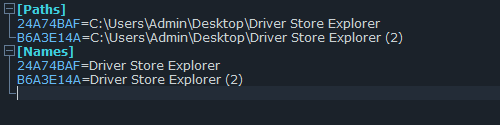
Странно, я проверил, все работает хорошо, как просто ahk так и с компилированный, что я только в него не кидал, все пишет, думаю проблема в другом, не в приложении.

Цитата: Андрей от 02.08.2026, 21:13Mikhail, Приветствую. Возможно ли добавить в скрипт перетаскивание на иконку скрипта при множественном выделении. Сейчас копируется только первый элемент.
Mikhail, Приветствую. Возможно ли добавить в скрипт перетаскивание на иконку скрипта при множественном выделении. Сейчас копируется только первый элемент.
Цитата: Андрей от 02.08.2026, 21:25P.S. На иконку скомпелированного скрипта (exe).
P.S. На иконку скомпелированного скрипта (exe).
Цитата: Mikhail от 03.08.2026, 04:07Андрей, Привет, можно.
[spoiler title="код"]#NoEnv #NoTrayIcon #SingleInstance Force SetWorkingDir %A_ScriptDir% IniFile := "links.ini" CRC32(str) { static t := [] if (!t.MaxIndex()) { Loop 256 { c := A_Index - 1 Loop 8 c := (c >> 1) ^ (0xEDB88320 * (c & 1)) t[A_Index - 1] := c } } c := 0xFFFFFFFF Loop Parse, str c := (c >> 1) ^ t[(c ^ Asc(A_LoopField)) & 0xFF] return Format("{:08X}", c ^ 0xFFFFFFFF) } if (%0% > 0) { Loop, %0% { arg := %A_Index% Loop, Parse, arg, `n, `r { Loop, Files, %A_LoopField%, FD { FullPath := A_LoopFileLongPath FileName := RegExReplace(A_LoopFileName, "\.[^.]+$") Key := CRC32(FullPath) IniWrite, %FullPath%, %IniFile%, Paths, %Key% IniWrite, %FileName%, %IniFile%, Names, %Key% } } } ExitApp } IniRead, NamesSection, %IniFile%, Names IniRead, PathsSection, %IniFile%, Paths if (NamesSection = "" || NamesSection = "ERROR") ExitApp Paths := {} MenuKeys := {} Loop, Parse, PathsSection, `n, `r { if (A_LoopField = "") continue s := StrSplit(A_LoopField, "=") k := Trim(s[1]) v := Trim(s[2]) if (k != "" && v != "") Paths[k] := v } Loop, Parse, NamesSection, `n, `r { if (A_LoopField = "") continue s := StrSplit(A_LoopField, "=") k := Trim(s[1]) n := Trim(s[2]) if (k = "" || n = "") continue Menu, MyMenu, Add, %n%, LaunchItem MenuKeys[n] := k p := Paths[k] SplitPath, p,,, ext if (InStr(FileExist(p), "D")) { Menu, MyMenu, Icon, %n%, shell32.dll, 4 } else if (ext = "exe" || ext = "dll" || ext = "ico") { Menu, MyMenu, Icon, %n%, %p%, 0 } else { Menu, MyMenu, Icon, %n%, shell32.dll, 2 } } Menu, MyMenu, Show Return LaunchItem: k := MenuKeys[A_ThisMenuItem] TargetPath := Paths[k] if (TargetPath = "") MsgBox, 16, Ошибка, Не удается найти путь для "%A_ThisMenuItem%". else { Run, "%TargetPath%", , UseErrorLevel if ErrorLevel MsgBox, 16, Ошибка, Не удается открыть "%TargetPath%". } Return[/spoiler]
Андрей, Привет, можно.
#NoEnv
#NoTrayIcon
#SingleInstance Force
SetWorkingDir %A_ScriptDir%

IniFile := "links.ini"

CRC32(str) {
    static t := []
    if (!t.MaxIndex()) {
        Loop 256 {
            c := A_Index - 1
            Loop 8
                c := (c >> 1) ^ (0xEDB88320 * (c & 1))
            t[A_Index - 1] := c
        }
    }
    c := 0xFFFFFFFF
    Loop Parse, str
        c := (c >> 1) ^ t[(c ^ Asc(A_LoopField)) & 0xFF]
    return Format("{:08X}", c ^ 0xFFFFFFFF)
}

if (%0% > 0) {
    Loop, %0% {
        arg := %A_Index%
        Loop, Parse, arg, `n, `r
        {
            Loop, Files, %A_LoopField%, FD
            {
                FullPath := A_LoopFileLongPath
                FileName := RegExReplace(A_LoopFileName, "\.[^.]+$")
                Key := CRC32(FullPath)
                IniWrite, %FullPath%, %IniFile%, Paths, %Key%
                IniWrite, %FileName%, %IniFile%, Names, %Key%
            }
        }
    }
    ExitApp
}

IniRead, NamesSection, %IniFile%, Names
IniRead, PathsSection, %IniFile%, Paths
if (NamesSection = "" || NamesSection = "ERROR")
    ExitApp

Paths := {}
MenuKeys := {}

Loop, Parse, PathsSection, `n, `r
{
    if (A_LoopField = "")
        continue
    s := StrSplit(A_LoopField, "=")
    k := Trim(s[1])
    v := Trim(s[2])
    if (k != "" && v != "")
        Paths[k] := v
}

Loop, Parse, NamesSection, `n, `r
{
    if (A_LoopField = "")
        continue
    s := StrSplit(A_LoopField, "=")
    k := Trim(s[1])
    n := Trim(s[2])
    if (k = "" || n = "")
        continue

    Menu, MyMenu, Add, %n%, LaunchItem
    MenuKeys[n] := k

    p := Paths[k]
    SplitPath, p,,, ext

    if (InStr(FileExist(p), "D")) {
        Menu, MyMenu, Icon, %n%, shell32.dll, 4
    } else if (ext = "exe" || ext = "dll" || ext = "ico") {
        Menu, MyMenu, Icon, %n%, %p%, 0
    } else {
        Menu, MyMenu, Icon, %n%, shell32.dll, 2
    }
}

Menu, MyMenu, Show
Return

LaunchItem:
    k := MenuKeys[A_ThisMenuItem]
    TargetPath := Paths[k]
    if (TargetPath = "")
        MsgBox, 16, Ошибка, Не удается найти путь для "%A_ThisMenuItem%".
    else {
        Run, "%TargetPath%", , UseErrorLevel
        if ErrorLevel
            MsgBox, 16, Ошибка, Не удается открыть "%TargetPath%".
    }
Return